Showing posts with label SwitchList. Show all posts

Monday, September 3, 2012

SwitchList: Suggesting Cargos

When I first started doing model railroad operations, the worst part (after fixing all the rare derailments and mechanical problems) was writing up the car cards. I had to write down a couple hundred possible cargos and routes to name all the possible things that boxcars could be carrying on my railroad. Canned fruit from Del Monte to the East Coast. Cattle being unloaded at Alma. Crates going to the packing house in Campbell. It was tedious and annoying work, and when I realized I didn't have the amount of traffic right, I had to go and write more cards. After all that, I created SwitchList so I wouldn't have to write all those cards.

SwitchList cuts the effort, but while I don't have to make twenty cards for all twenty cars of dried fruit leaving from Plant 51, I still have to decide what shipments might be received or sent from each industry. It's possible to learn what each industry might ship, either from books or from the OPSIG industry database, but that's stuff the computer ought to know how to do well, right?

Time to make that computer work a bit harder.

SwitchList-1.1.1 now contains a "Suggest Cargos" feature where you can name an industry, and it'll suggest some potential cargos that can be shipped from or received by the industry. SwitchList will guess at your industry based on its name, let you adjust its guess, then suggest several cargos that would be appropriate from that industry.

For now, the feature's simplistic; not all kinds of industries are listed, and some that are listed only have a few suggestions. But I think this could be helpful; I'd love feedback on whether you find this to be a useful feature, and I'd appreciate suggested cargos to include.

Check out the latest version of SwitchList over at the main SwitchList site, try it out, and if you like the Suggest Cargos feature, make some suggestions of your own about potential industries and cargos that SwitchList ought to know about!

Thursday, August 30, 2012

SwitchList: Now on the Mac App Store!

Downloading software is so twentieth-century. Click, download, open the disk image, copy to your disk. If you're used to downloading software, it might not seem like a big deal, but there's a lot of Mac users out there who aren't used to downloading strange software on the Internet.

Luckily, if you're running a recent Mac, you can now just fire up the Mac App Store, search for SwitchList, and have your own copy of SwitchList put safely on your Mac with none of that downloading and installing. The App Store version of SwitchList is the same as the version you'd download from the SwitchList homepage, and it's the same free price. You'll also be able to update SwitchList easily when new versions come out.

I'll continue to have copies of SwitchList to download at the SwitchList home page. Downloaded versions will usually have features and bug fixes a bit sooner than the App Store, so if you want to try out new versions before anyone else, watch the SwitchList mailing list and download new versions as they appear. The source code to SwitchList will continue to be available at code.google.com if you're interested in making your own tweaks to the program, or want to help make SwitchList even more useful.

Wednesday, April 11, 2012

SwitchList: Move Cars By Shuffling Waybills

One of my early decisions when designing SwitchList, the Mac program for creating lists of freight cars to move, was to make it real. I wanted paperwork that looked like the real thing, and I wanted paperwork that looked handwritten. I'd declared:
Make it beautiful. SwitchList's paperwork shouldn't look like it was printed on a twenty-year-old IBM PC (unless the real switchlists were). Forms should be handwritten. Bonus points for adding greasy fingerprints automatically.

Now, beautiful and realistic is a nice goal. But real railroaders didn't always start off with switchlists. The decisions about which cars a train would move started when the conductor picked up his stack of waybills, the official record of what the car was carrying and who was being billed for the cost of transportation. The switchmen might use the waybills to make their own switchlist cheat sheets, but the waybills were the primary source of truth.

Tony Thompson has written several blog articles over the last year about how the car cards he uses are meant to resemble the look of a typical waybill, or some of the other typical railroad paperwork. They look great... but I don't use car cards, I use switchlists. So could SwitchList generate waybills like it generates switchlists?

With SwitchList's custom switchlist templates and a bit of web savvy, it's certainly possible. The photo shows the result of a few day's work - an example waybill with values filled in straight from SwitchList. Making this required the same kind of work as making a web page - describing the waybill's graphic design using HTML, using SwitchList's template language to indicate where car initials and numbers get filled in, and a little magic code to make a guess at the car's potential route.

I've made the custom template to generate Waybills public; it's experimental and a bit rough, but if you're interested in making a complex switchlist template, it might give you some hints. You can copy the template from code.google.com). It isn't yet included with the SwitchList program; instead, copy the files down and install them as mentioned in the README file.

Better yet, if you have an iPhone, then you can see the switchlists in detail when you connect to SwitchList through its web interface. Best of all, you can swipe with your finger to look at the previous and next waybill.

Try out a demonstration of the SwitchList Waybill template on your iPhone (or computer) by clicking on this example. (If you load it into your computer's web browser, change which waybill you're looking at by pressing the mouse button and dragging the mouse.) I'm still a big fan of giving my operators a paper switchlist, so I'm probably unlikely to encourage people to browse waybills on their phone, but you might find this just what your layout needs!

Comments and suggestions welcome.

[Photo: Jack Delano photo for the Farm Security Administration, 1943. From Library of Congress.]

Saturday, November 5, 2011

SwitchList: Keep Those Sidings Open!


If there's one problem all small layouts have, it's space. There's never enough yard tracks for the incoming freight cars, and the sidings never are long enough to hold the arriving cars.

The new version of SwitchList keeps your sidings from overflowing. SwitchList 0.9.0 now lets you name the length of each siding. If SwitchList notes that an arriving car will cause the siding to overflow, it'll hold that car at its current location till space opens up.

Don't worry, you don't have to go and measure all your sidings right now. Like SwitchList's door spotting location feature, you can turn the siding length checks on and off. SwitchList also doesn't demand you fill in every single detail about your layout. You can fill in the lengths of only the troublesome or short sidings, and then add information for the rest of your layout when you've got time. SwitchList works just fine with partial information.

Also in SwitchList 0.9.0: The new version also allows you to design your own report styles, just as you can design your own switchlists. If your railroad has a custom or recognizable style of paperwork for yard crews, you can now provide a template for SwitchList that matches that look, and SwitchList will print that report exactly the way you want. You can do this for the common report styles. The industry reports that show locations of cars grouped by siding, car reports that list cars in reporting mark order, and yard reports that show the train for each outgoing car all can be customized.

Check out the example custom reports in the Handwritten, Southern Pacific Narrow, and Line Printer reports inside SwitchList. Check out the documentation on how to write your own switchlist and report styles at the SwitchList development site, and consider sharing your favorite switchlist style with the rest of the SwitchList user community.

Finally, our next stop is SwitchList 1.0! What features do you think SwitchList needs before it can be declared "complete"? Add your suggestions on SwitchList's bug list, and join the SwitchList mailing list and discuss your ideas, and consider making your own changes to SwitchList!

[Photo: Snoboy transload facility on Seth Neumann's Niles Canyon layout.]

Sunday, October 9, 2011

Train Orders on a Small Layout? Answer Hazy.

Thanks to the fortunate arrival of a coworker from out of town, I had my first operating session in months today, and it went well.  One fatality - a brakeman was brutally run over by the Santa Cruz Passenger.  Although all crews are warned to use flagmen on the broad curve between Campbell and San Jose, I need to warn folks to put the flagman far enough out so a crew in the aisle might see it.  All the trains also ran, even the San Jose Turn with its mixed freight that had twice as much to do because it didn't fully run last time.  The new track at Campbell for the Hyde Cannery and Sunsweet packing house worked well, though it would have worked better if the track didn't get filled with eight cars by session end.  (For those of you wishing that SwitchList would avoid sending cars to overflowing sidings, lets just say I feel your pain.

More importantly, I tried out my idea of simple train orders for trains going between Vasona Branch and Santa Cruz.  On the good side, I think it did encourage the crews to think a little bit about where they were going and where they'd have to meet those other trains, and it did encourage some of the typical railroader "oh, great, we're stuck at lowest priority."  I did make sure to write the orders at the last minute so no one ended up stuck on a siding for an hour because of bad planning.  On the bad side, there was still an awful lot of paper to write up, and for the crews going from San Jose to Los Gatos, the amount of interpretation they needed to go that last two feet from Vasona Junction to Los Gatos was a little annoying.

But a good time was had by all, and except for a couple balky cars, one unpowered frog, some dirty track, and a tree leaning into the right-of-way, things went well.

Saturday, September 10, 2011

So You Think You Can Design A Switch List?

One of the more photogenic features of my
SwitchList
car assignment program is that the switch lists it displays are attractive and realistic. Many of the commercial programs out there just do computerized lists that could have been printed on a 1980's dot matrix printer. I'm pleased SwitchList doesn't do that (or doesn't just do that) - it can fool people into thinking I've been up all night writing my switchlists by hand, can imitate the standard SP switchlist form, the San Francisco Belt Line's form B-7, or (thanks to James McNab) the PICL-style computerized car list form.

Doing attractive and realistic switchlists is nice, but one of the common requests I hear is to allow others to design their own switchlists, even if they're not Macintosh programmers.

Y'all have got your wish.

The newest version of SwitchList, version 0.8.0, now allows you to design your own switchlist style, then use it both for printed switchlists and for the web-based switchlists you can view on your iPad or iPhone during an operating session. Creating a switchlist requires a bit of knowledge of HTML and making web pages, but you can get pretty far without any sophisticated knowledge of how to make web pages, and there's lots of people out there who can give you advice.

Why would you want your own custom forms?
* Change font sizes or arrangements of the standard switchlists to meet your special needs.
* Duplicate your prototype railroad's switch list form.
* Experiment with better ways to help your operators see what work is to be done.
* Make switchlists that *really look* like they've been printed on a dot-matrix printer.

Or maybe you'll just want to do something crazy, and design a switchlist for the Thomas the Tank Engine crowd. I have had a lot of four year old operators, now that I think of it.

Documentation on creating your own switch list is available on the SwitchList open source page. More documentation's probably needed, so make sure to ask questions over on the SwitchList mailing list so I know what needs improving.

And don't forget to share your final results! I'm looking forward to seeing what y'all can do!

Saturday, April 23, 2011

SwitchList - now with PICL Reports and the SF Belt Line's Form B-7!

There's a new version of my SwitchList program available today. Two of the big improvements in the new version are a pair of new switchlist styles to help your model railroad paperwork look more like the real thing!

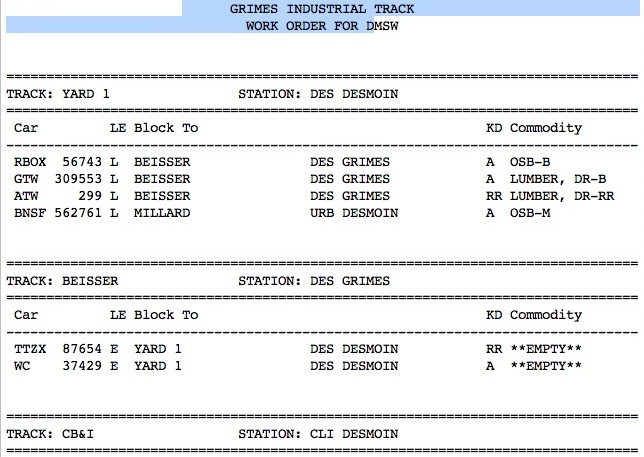
The first is the computerized PICL Report, used by many modern (post-1980) railroads. PICL stands for "Perpetual Inventory of Car Locations", and the switchlist presents information in terms of the cars being picked up on tracks at each station.

James McNab created this switchlist style for his planned Iowa Interstate layout, and it'll be useful for any other modern railroader using similar paperwork.

The second switchlist style imitates the San Francisco Belt Railroad's Form B-7. Because the San Francisco Belt Railroad acted only to move cars between shippers and the railroads actually handling the freight, their switchlists were actually individual forms provided by each shipper naming the cars to pick up and drop off at that industry. SwitchList's B-7 shows all cars to be switched for a given town rather than specific industry, so for the B-7 to be prototypical, you might need to change the idea of "town" to "each large industry". Even if your own railroad wouldn't use the B-7, you might find it worth using!

Check out Bill Kaufman's article on the Belt Railroad's odd paperwork in the July 2009 issue of Railroad Model Craftsman.

The new version of SwitchList also includes "fixed rate" cargos with none of the randomness that SwitchList normally provides. If you ask for three cars a day to be filled with a given cargo, then SwitchList will give you three cars a day with that cargo.

There's other improvements to SwitchList - check out the SwitchList home page for more information.

Monday, February 21, 2011

SwitchList: Now with SP-style switchlists!

It's always interesting during an operating session to see who picks up one of the prepared switchlists and asks me how my penmanship got so good. I always have to confess that my switchlist generation program did all that fine lettering, including the random position jitters to make it look more human.

That program, SwitchList, now generates paper switchlists that resemble the Southern Pacific's own switchlists for that oh-so-prototypical look and feel. It'll even do a rushed scribble down a column of cars going to the same location. Download SwitchList and check it out yourself. If you've got questions or want to suggest some ideas for improvement, let me know at the SwitchList mailing list.

Saturday, February 5, 2011

SwitchList's New Feature: Spotting Cars at Specific Doors

On large layouts, it's easy to add to the challenge of operation and switching. You just throw more freight cars at the poor crew... or more industries, or more interrupting trains. With smaller layouts like mine, finding ways to challenge the operators and slow them down is a big problem. If they can dash through a switching assignment in 15 minutes, then I've got to find other realistic projects for them to do. If I can drag that switching assignment out to an hour by realistic, interesting, challenging problems, I'll need to do less to keep them entertained.

One way I increase the challenge is to specify which door a freight car must be placed at. Large industries often had specific rules about where cars would be placed. In an auto plant, boxcars of parts needed to be placed closest to the part of the assembly line using those parts. A cannery or packing house might want the freight car for a load placed closest to where the cargo is in the warehouse. On my layout, several industries are large enough to have multiple doors or spotting locations, such as Del Monte Plant 51, the large dried fruit packing plant just off the Alameda west of downtown San Jose.

But writing down door spotting assignments is tedious and annoying, and the computer ought to be able to do it as well. My program for automatically generating switchlists, Switchlist, has always had space to indicate when an industry cared about doors, but it's never been hooked up... til now.

The latest version of SwitchList, version 0.6.3, includes support for assigning cars to specific doors. It also includes a feature for importing freight car numbers from a text file so you can transfer your list of cars from another program into SwitchList. There's also new documentation.

Finally, my layout's in the garage, but my Mac with the switchlists is in the house. Checking that the layout and the software agree on car locations usually requires me to print out the locations of all cars, go to the garage, double-check it all, then come back inside and fix locations if needed. Instead, the new version of Switchlist can connect to an iPad or a web browser on another computer in the garage, and let you check car locations and (eventually) correct car locations from the iPad.

Sunday, November 14, 2010

SwitchList: Feedback Wanted

If you tried out my SwitchList program for the Mac when I mentioned it a couple weeks back, I'd appreciate any feedback you've got.

I made the app public in hopes of figuring out what next to do with it. I knew it worked well for my layout and was a great improvement for me over car cards and other routing systems, but wasn't sure whether it would be useful to all of you out there. I wasn't sure which features to add or bugs to fix to make it particularly useful. Should I stay with the small layout focus or aim for more complex layouts? Should I finish the feature for spotting cars at particular doors of an industry? Are there better ways of printing the switchlists? I'm also trying to decide whether to keep working on it on my own, or whether there are others out there who might have features they think are worth adding.

If you tried it and had comments (and especially if you tried it and found it wouldn't work for you), I'd appreciate hearing your comments, either on this post or via e-mail.

Sunday, October 31, 2010

Busman's Holiday

I spent a good part of the weekend on a busman's holiday - cleaning up the computer program I use for deciding which boxcars get switched during an operating session. It's cleaned up enough so that I'm willing to let others try it out.

Go check out a very early version of SwitchList if you've got a Mac, and could use a computerized switchlist generator for your layout.

Now, if you don't know why you'd need that, let's talk about model railroad operations.

If model railroad operation is a game, then figuring out what has to be done during the game is a key detail. For the operations game, the question is "where do the trains run" and "what freight cars do the trains need to switch?" There have been all sorts of ideas proposed over the life of the hobby. Some use car cards that can be picked randomly to figure out where a car should move. John Allen, a famous modeler from the 1960's, drilled holes in his freight car roofs and stuck colored tacks in to indicate the destination of each car. (Rumor has it a real railroad tried this once, but stopped after accidentally drilling holes in the roofs of new cars held in a car carrier.) Others have placed scraps of paper with placement instructions on the top of freight cars. Others go with the simplest approach and roll dice at each town to figure out the number of cars to pick up and drop off in each town.

When I first started operating the Vasona Branch, I tried the car cards approach. I photocopied a couple hundred of the cardboard slips to represent the cars and the cargo they carried, and spent a couple nights on the repetitive task of writing down potential actions. "Take a boxcar from Plant 51 back to staging." "Take another boxcar from Plant 51 back to staging." "Take a stockcar up to the passing siding at Alma." "Take another boxcar from Plant 51 to staging, but this time pretend you're sending it to Cleveland." It was slow, painful work.

At the operating session, I dealt out a card for each freight car, and paper-clipped the cargo card to the card representing the freight car, gave a stack to my operators, and let them start. The cards worked decently - the print was a bit small, but they weren't too hard to handle, and they were easy to find if someone dropped his cards on the garage floor. I needed a place to put all those cards, so I glued together some small plastic pockets out of styrene sheet to hold the cards for the freight cars at each industry.

It worked ok, but after a few sessions, I wasn't as happy. The cargo cards just specified a kind of car - "this car is for a tank car, that for a refrigerator car.' But the process of picking an appropriate car for appropriate lading in the real world is much more complex. There are elaborate rules about what to do to return a boxcar after it's carried a load to another railroad. Generally, the rule is that the car can be reused for a load heading back towards the owning railroad, but if no loads are going in the right direction, the freight car needs to be sent back to its owner as fast as possible. (Read a bit about demurrage here or here too if you'd like a future in transportation law.) One bit of fallout of that is that cars on my layout from a non-Southern Pacific railroad -- such as those East Coast boxcars -- should only appear on industry sidings that might either send or receive lading from the east coast.

And so, one day I look at the concrete warehouse spur in front of Plant 51, and I see a Florida East Coast ventilated boxcar sitting there, and I know that there's absolutely no reason why that car should be there. No one would have *any* reason to ship cement from Florida to California in the 1930's. Nothing in that warehouse would be heading the other way from California to Florida. It's just wrong for that car to be there, and I'm annoyed. Obviously it doesn't take much to annoy me.

Now, there's ways of tuning car cards to avoid that sort of problem. Maybe mark certain cards according to which railroad's cars can hold them. Similarly, when I got annoyed that the dirtiest boxcars were ending up hauling canned fruit for Del Monte, I could have started marking which cargo cards required "clean" boxcars, and which cargos could go in the dirtiest, most weathered boxcars. But that requires writing a lot of car cards, and I'd had my fill of that.

There are some commercial Windows-only programs for generating switchlists or waybills, but they were all for Windows only. I found some free switchlist software, but found them cryptic and hard to use. Yes, I'm proud I can tweak some strange configuration file for a twenty-year-old command line program to add a couple new freight cars to the system, but I don't really want to do that regularly.

So the solution was to write my own program for the Mac, and it's been sitting on my computer for a few years now. It's usually worked ok, but I've never spent enough time to actually polish it or get it in a state where others might be able to use it. One of my biggest problems was that that car assignment algorithm was messy, and I didn't have any easy ways to test that any change I made wasn't going to break the software completely. Fortunately, I tried using the automatic unit testing code for the Mac (specifically the OCUnit Objective-C unit testing framework), and spent the weekend adding hundreds of tests to make sure that cars moved reasonably correctly. Between that and some cleanup of how stuff is stored on the computer disk, SwitchList was finally at a state to let others check it out.

So try it out, see if it's useful for you, and let me know how it works!